Add real-time autotune to your voice for free with Voicemod. Pitch correction, voice tuning, and pitch shifting live on Discord, in-game, and on stream. No DAW required.
Real-time autotune voice effects
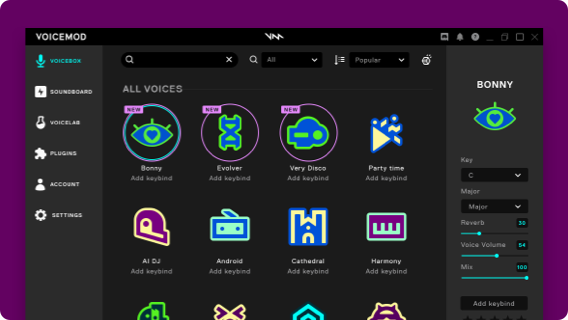
Ready to use voicetune effects
Evolver
 Official voice
Official voice

Bonny
Official voice
Official voice
Very Disco
Official voice
Official voice
Trap Tune
Official voice
Official voice
Calitune
Official voice
Official voice
Your key to real-time autotune
You don’t need perfect pitch to stay in tune. Voicetune is a real-time autotune that corrects your voice as you speak or sing, with zero delay and zero editing. No recording, no post-production, no waiting. Whether you’re a trained singer or someone who only performs in the shower, you’ll hear the tuned version of your voice live, the moment it leaves your mouth.
Pitch Correction for Your Voice
Auto Voicetune gives you two ways to shape your sound. Pitch correction is the subtle one: it keeps every note in key while your voice still sounds like you, perfect for singing along to music in voice chat or adding that polished vocal effect to your gaming callouts. Pitch shifting is the dramatic one: it moves your entire voice up or down in full semitone jumps for a stylized, clearly processed sound. Go higher for a pitched-up version of yourself, lower for something deeper, or land anywhere in between. Both live inside Voicemod, and you can switch between them whenever you want.
Real-Time Autotune: How It Works
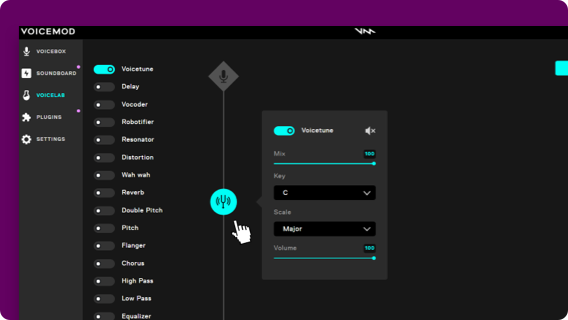
To create your own voice changer for singing, follow these steps:
- Download Voicemod auto tuning app from this page and install it on your PC
- Open the Voicelab on the left hand side menu and enable ‘Hear Myself’ and ‘Voice Changer
- Now, in the Voicelab, enable ‘Voicetune’ and choose the key and scale that match the song you want to sing along to
- Once you have your newly created voice, name it and press Save
- Your singing voice will now appear in your Voicebox together with the rest of voice changer options
Tune up your roleplaying and voice acting
Whether you want to meme with friends in games, roleplay as a music superstar, or nail your next T-Pain, Travis Scott, or Post Malone impression, the auto voice tuner effects have you covered. Switch in and out of your tuned voice with shortcuts and keybinds to keep the musical vibes rolling, mid-game or mid-call.
Want more? Read about How to sing better in our blog.

Works wherever you hang out online.
Not only in voice apps like Discord, but also in-game voice chats.